Set up a Cosmos-compatible wallet
To interact with the Cosmos ecosystem, you need a wallet that speaks the Inter-Blockchain Communication (IBC) protocol. Standard Ethereum wallets like MetaMask won't work out of the box because Cosmos uses a different signing standard and address format. You need a tool that supports Cosmos SDK chains natively.
Start by selecting a wallet built for the Cosmos ecosystem. Keplr is the most widely used option for desktop browsers, while Leap is a strong alternative for mobile users. These wallets are designed to handle ATOM and other Cosmos SDK tokens without extra configuration.
Download the official extension from the Chrome Web Store or the official app from your device's app store. Avoid third-party links. Once installed, create a new wallet. The app will generate a 12-word recovery phrase. Write this down on paper and store it securely. Never digitize it or share it with anyone.
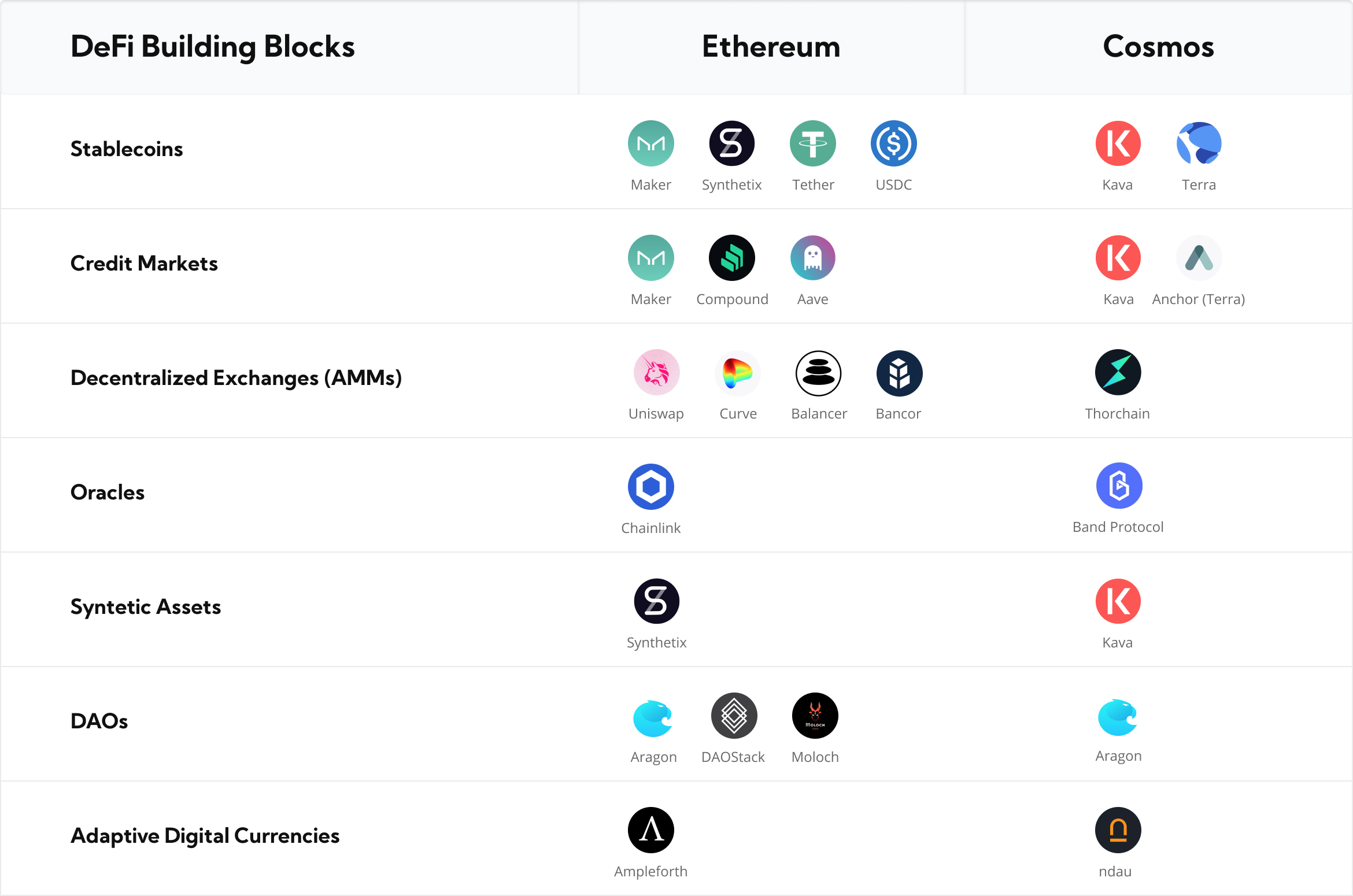
Ensure your wallet is set to the Cosmos Hub mainnet. Most Cosmos-compatible wallets allow you to add custom chains, but for initial setup, stick to the default Cosmos Hub network. This ensures you can send and receive ATOM and interact with the primary Cosmos DeFi infrastructure.
Once set up, send a small test amount of ATOM from an exchange to your new wallet address. This confirms that your wallet can receive funds and that your address is correctly formatted. If the transaction fails, double-check that you selected the Cosmos network (not Ethereum or Bitcoin) when withdrawing from the exchange.
With your wallet configured, you are ready to bridge assets and explore the broader Cosmos ecosystem.
Fund your account with ATOM or stablecoins
Before you can stake ATOM or trade on Cosmos-native exchanges, you need to move assets into the ecosystem. You can acquire tokens through centralized exchanges (CEXs) like Binance or Kraken, or transfer them directly from another wallet using a bridge.
Buy ATOM on a centralized exchange
The fastest way to get started is purchasing ATOM on a major exchange. These platforms offer high liquidity and often allow you to deposit fiat currency directly. Once bought, you will need to withdraw the tokens to your Cosmos-compatible wallet, such as Keplr or Leap. Always double-check the withdrawal network to ensure you are sending ATOM via the Cosmos Hub chain, not an ERC-20 version from Ethereum.
Bridge stablecoins into Cosmos
If you prefer using stablecoins, you can bridge USDC or other assets from Ethereum or Solana into the Cosmos ecosystem. This process involves locking your tokens on the source chain and minting a wrapped version on the Cosmos Hub or a connected zone like Osmosis. While this opens up DeFi opportunities like lending and liquidity provision, bridging introduces smart contract risk. Stick to official bridges or well-audited protocols to minimize the chance of loss.
Check the live price
ATOM prices fluctuate based on market conditions. Use a live widget to track the current value before making large transfers or swaps.
Stake ATOM to secure the Cosmos Hub
Staking ATOM is the primary way to participate in the Cosmos Hub's economic and governance layers. By locking your tokens, you help secure the network through the Proof-of-Stake consensus mechanism while earning rewards from transaction fees and inflation. With the upcoming IBC 2.0 upgrade, the role of the Hub is shifting from a simple relay to a more active security provider for the broader Cosmos ecosystem.
1. Set up a Cosmos-compatible wallet
You need a wallet that supports the Cosmos SDK and IBC protocol. Keplr is the most widely used option for interacting with the Cosmos Hub. Ensure your wallet is updated to the latest version to support IBC 2.0 features, which may introduce new interface elements for cross-chain interactions. Back up your seed phrase securely; losing it means losing access to your staked assets permanently.
2. Transfer ATOM to your wallet
Acquire ATOM from a centralized exchange or another wallet and transfer it to your Keplr address. Verify that you are sending ATOM to the Cosmos Hub (cosmoshub-4) chain. Double-check the recipient address and the network selection to avoid sending funds to the wrong chain. Once the transaction confirms, your balance should appear in your wallet.
3. Select a validator
Navigate to the staking section in your wallet and choose a validator. Look for validators with high uptime, reasonable commission rates, and sufficient delegation. Avoid validators who are over-delegated or have a history of downtime, as they may not distribute rewards efficiently. You can use the Cosmos Hub explorer or third-party dashboards to compare validator performance.
4. Delegate your ATOM
Enter the amount of ATOM you wish to stake and confirm the transaction. This action locks your tokens and assigns them to your chosen validator. You will receive staked ATOM (stATOM) in return, which represents your share of the validator's total stake. You can track your rewards and delegation status directly in your wallet.
5. Manage your stake and governance
Once staked, you can participate in on-chain governance by voting on proposals. Your voting power is proportional to your staked ATOM. You can also redelegate or unbond your tokens if needed, though unbonding takes 21 days on the Cosmos Hub. Keep an eye on IBC 2.0 updates, as they may introduce new ways to interact with the Hub's security services.
Install and set up Keplr or another Cosmos-compatible wallet. Secure your seed phrase and ensure the wallet is connected to the Cosmos Hub network.
Transfer ATOM from an exchange to your wallet address. Verify the chain is Cosmos Hub (cosmoshub-4) and wait for confirmation.
Browse the validator list and select one with high uptime, low commission, and sufficient capacity. Check their governance voting record.
Enter the amount of ATOM to stake, confirm the transaction, and receive stATOM. Your rewards will begin accruing immediately.
Swap assets using IBC-enabled DEXs
Cross-chain swaps on the Cosmos ecosystem work differently than on Ethereum. Instead of relying on centralized exchanges or risky third-party bridges, you use the Inter-Blockchain Communication (IBC) protocol. This allows tokens to move directly between independent blockchains like Osmosis, Celestia, and the Cosmos Hub.
IBC-enabled Decentralized Exchanges (DEXs) act as the liquidity layer for this movement. They facilitate atomic swaps, meaning the transaction either completes fully on both chains or fails entirely, eliminating the risk of stuck assets. This mechanism removes the need for centralized intermediaries, keeping your funds under your control throughout the process.
1. Set up a compatible wallet
Start by installing a wallet that supports Cosmos IBC, such as Keplr or Leap. These wallets are designed to manage multiple chains within a single interface. Ensure you have the native tokens for the specific chains you plan to interact with, as each blockchain requires its own gas fees for transactions.
2. Select an IBC-enabled DEX
Navigate to a reputable DEX built on the Cosmos network, such as Osmosis. These platforms are optimized for IBC liquidity pools. Look for the "IBC" or "Cross-Chain" tab in the interface. This section displays available assets from other connected chains that you can swap directly.
3. Connect your wallet
Click the "Connect Wallet" button and authorize the connection. The DEX will read your balances across all supported chains. Verify that your wallet is connected to the correct network. If you are swapping from a chain that requires a specific IBC channel, ensure your wallet has the necessary channel keys enabled.
4. Initiate the cross-chain swap
Enter the amount of tokens you wish to swap and select the destination chain. The interface will show you the exchange rate, slippage tolerance, and estimated gas fees. Review these details carefully. Unlike simple swaps, cross-chain transactions may take slightly longer due to the IBC packet relay process.
5. Confirm and monitor
Approve the transaction in your wallet. You will receive a transaction hash for both the source and destination chains. Monitor the status on a block explorer like Mintscan. Once confirmed, the tokens will appear in your wallet on the destination chain. This entire process happens without a centralized custodian holding your assets.
Essential gear for secure DeFi
Interacting with DeFi protocols requires careful security practices. Using a hardware wallet adds a critical layer of protection against phishing and smart contract risks. Below are recommended devices for managing your Cosmos assets safely.



As an Amazon Associate, we may earn from qualifying purchases.
Quick checklist
-
Install a Cosmos-compatible wallet (Keplr or Leap)
-
Fund your wallet with native gas tokens for target chains
-
Verify DEX liquidity pools for your desired token pair
-
Check IBC channel status for low latency
-
Confirm transaction details before signing
Frequently asked: what to check next
Final takeaways
- IBC enables trustless, direct token swaps between Cosmos ecosystem chains.
- Use IBC-enabled DEXs like Osmosis for cross-chain liquidity.
- Always verify transaction details and monitor block explorers for confirmation.
- Secure your assets with a hardware wallet when interacting with DeFi protocols.
Avoid common IBC bridge risks
The Inter-Blockchain Communication (IBC) protocol is the backbone of the Cosmos ecosystem, but it is not immune to failure. When bridges connect sovereign chains, they become high-value targets for exploits. In 2026, the most significant risks are not just technical bugs but often misconfigured smart contracts or outdated security audits on newer zones.
To protect your assets, treat every bridge interaction as a distinct security event. Do not assume that because a chain is part of the Cosmos ecosystem, its bridge to the Hub is secure. You must verify the specific contract addresses and audit reports before interacting with any new IBC pool.
Start by checking if the zone has undergone a recent third-party audit. Look for reports from reputable firms, not just internal reviews. If a new chain launches a bridge without a public audit, assume it is high-risk. Many early-stage projects skip this step to move fast, leaving users exposed to reentrancy attacks or logic errors.
Next, monitor the bridge’s total value locked (TVL) and historical incident reports. A bridge with a low TVL relative to its claimed capacity may be underfunded for security reserves. Check community forums and official channels for any reported anomalies. If you see unusual transaction patterns or delayed finality, pause and investigate before moving more funds.
Finally, use hardware wallets for all bridge transactions. Never connect your primary hot wallet directly to unverified dApps. By following these steps, you reduce the attack surface and ensure that your interaction with the Cosmos network remains secure and efficient.
Cosmos DeFi infrastructure FAQ
Here are answers to common questions about Cosmos DeFi infrastructure, focusing on mechanics, costs, and security.
No comments yet. Be the first to share your thoughts!