Pick your interchain liquidity path
Choosing where to park capital in the Cosmos ecosystem depends on how much control you want over your yield and how much risk you are willing to absorb. Think of the ecosystem as a network of distinct liquidity pools, each serving a different purpose. Your choice should align with your tolerance for smart contract risk versus protocol-level security.
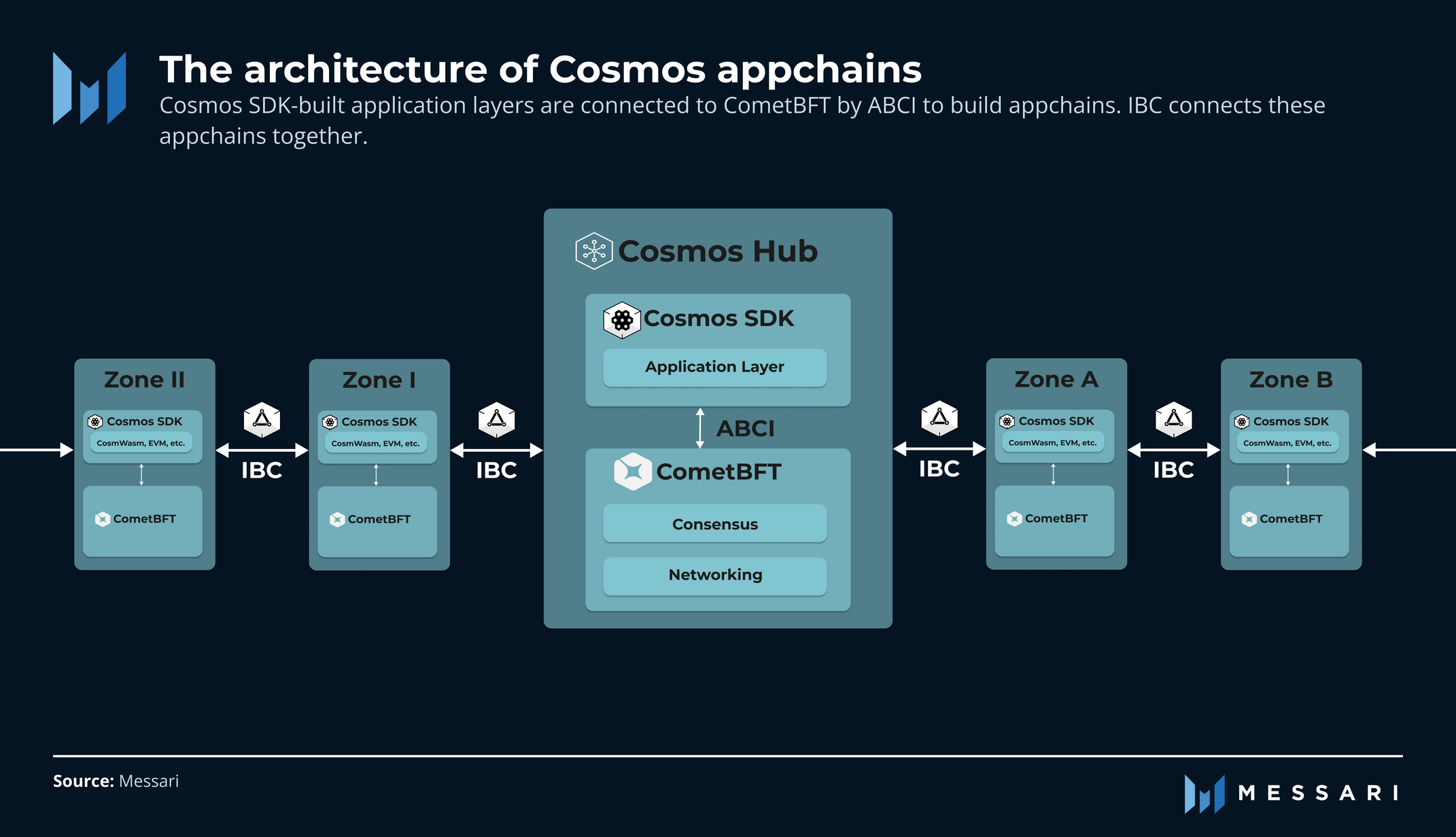
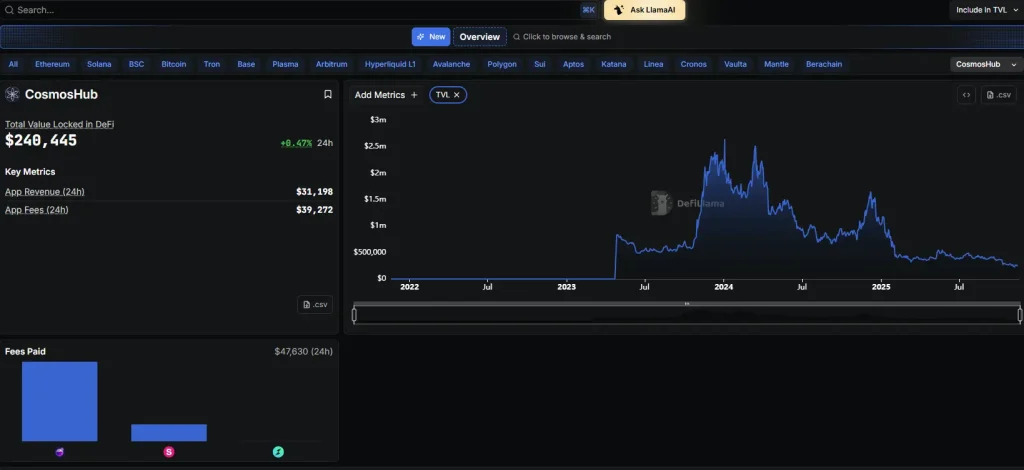
Cosmos Hub is the central security layer of the network. It is the safest place to hold ATOM for staking rewards, but it offers limited DeFi utility. Use this path if your primary goal is preserving capital while earning baseline staking yields with minimal smart contract exposure.
Osmosis is the primary decentralized exchange (DEX) and liquidity layer within Cosmos. It offers higher yields through liquidity provision but introduces smart contract risk. Choose this path if you are comfortable managing impermanent loss and actively seeking higher returns from trading fees and incentives.
Specific zones like Celestia or Injective offer specialized DeFi products. This path is for advanced users seeking exposure to niche narratives or specific tokenomics. It carries the highest risk due to lower liquidity and unproven track records compared to the Hub or Osmosis.
The following table compares the core trade-offs between these primary paths.
| Path | Risk Level | Primary Yield Source | Best For |
|---|---|---|---|
| Cosmos Hub | Low | Staking Rewards | Capital Preservation |
| Osmosis | Medium | LP Fees + Incentives | Yield Farming |
| Specific Zones | High | Variable | Niche Exposure |



As an Amazon Associate, we may earn from qualifying purchases.
Set up your IBC transfer workflow
Inter-Blockchain Communication (IBC) is the standard protocol that lets Cosmos chains talk to each other. Think of it as a secure, standardized shipping container for digital assets. Unlike centralized exchanges where you hand over custody, IBC moves assets directly between wallets using cryptographic proofs. This makes it faster and cheaper, but it also means you are responsible for verifying every step of the journey.
Setting up this workflow requires precision. A single mistake in the destination address or chain ID can result in permanent loss. We will walk through the process of moving ATOM from the Cosmos Hub to a compatible chain like Osmosis, focusing on the security checks that protect your capital.
IBC transfers require a wallet that supports the Cosmos SDK, such as Keplr or Leap. Install the browser extension or mobile app, then create a new wallet. Write down your 12-word seed phrase on paper and store it offline. Never digitize this phrase. Once set up, ensure your wallet is connected to the Cosmos Hub network so you can see your ATOM balance and transaction history.
Before initiating any transfer, confirm that the destination chain (e.g., Osmosis, Celestia, or Injective) has an active IBC channel with the Cosmos Hub. Check the official chain documentation or a trusted block explorer like Mintscan. If the channel is not open or is paused, your assets will be stuck in limbo. Ensure you have some of the destination chain’s native token (like OSMO) to pay for gas fees on the receiving end.
Navigate to the IBC transfer section in your wallet. Select ATOM as the asset and choose the Cosmos Hub as the source. Enter the destination chain and your exact wallet address on that chain. Double-check the chain ID and the recipient address character by character. IBC transactions are irreversible; if you send to the wrong address, there is no customer support to reverse it. Review the estimated time and gas fees before confirming.
Once confirmed, the transaction creates an IBC packet that travels through relayers. This typically takes 3 to 10 minutes, but can vary during network congestion. Do not assume the transfer is complete just because the Hub transaction shows "success." Wait for the assets to appear in your destination wallet. If they do not appear within 15 minutes, check the block explorer for the destination chain to see if the packet was dropped or failed.
Deploy liquidity on Osmosis pools
Osmosis is the central liquidity layer of the Cosmos ecosystem, acting as a decentralized exchange that allows you to provide liquidity across IBC pairs. Unlike centralized exchanges, Osmosis lets you earn trading fees by funding pools that other users trade against. To maximize capital efficiency, you should focus on concentrated liquidity, which lets you set specific price ranges rather than providing liquidity across the entire price curve.
Connect your wallet to the Osmosis interface. Navigate to the "Pools" tab and filter by IBC assets if you want exposure to other chains like Celestia, Neutron, or Injective. Choose a pair with sufficient volume to ensure meaningful fee generation. Avoid pools with low liquidity, as slippage will eat into your returns.
Toggle to "Concentrated Liquidity" (CL) mode. Standard liquidity spreads your tokens across all prices, requiring massive capital for small returns. CL mode lets you define a price range (e.g., $1.00–$1.10 for ATOM/USDC). Within this range, your capital works as if it were leveraged, significantly boosting your fee yield. Outside this range, your liquidity becomes inactive.

Input your desired price range based on your market view. If you believe the price will stay stable, choose a tight range for higher fees but higher rebalancing needs. If volatility is expected, widen the range to stay active longer. Deposit equal value amounts of both tokens. The interface will calculate the ratio automatically based on the current price.
Once deposited, your position is live. You earn fees proportional to your share of the pool. However, as the price moves, your position may exit your active range. You must periodically rebalance by withdrawing and redepositing within the new price range to maintain your fee-generating capacity. Use the "Rebalance" button on your position dashboard to do this efficiently.
Concentrated liquidity amplifies both gains and losses. If the price moves sharply outside your range, you may end up with a portfolio that is worth less than if you had just held the tokens. This is known as impermanent loss. It is most pronounced in volatile IBC pairs. Always ensure your risk tolerance matches the volatility of the assets you are providing.
IBC pairs introduce unique dynamics. Because assets come from different blockchains, you are exposed not just to price risk but also to bridge and network risks. Stick to well-established pairs like ATOM/USDC or TIA/USDC for the most stable fee environments. Avoid exotic pairs until you are comfortable with the rebalancing workflow.
Check your staking and governance setup
Your staking configuration is the engine of your Cosmos DeFi strategy. If you aren't earning rewards or participating in governance, you are leaving value on the table and reducing the security of the network you rely on. The Cosmos Hub acts as the central settlement layer for the IBC protocol, which allows different blockchains to exchange data and tokens. This interoperability is the foundation of the ecosystem, but it requires active validator participation to function correctly.
Start by verifying your delegation status. Ensure your ATOM is staked with a reputable validator who maintains high uptime. Check that you have claimed any available rewards and that your delegation is active. If you are using a hardware wallet or a non-custodial interface, confirm that the signing key is secure and that you can access your governance votes.
Next, review your governance participation. The Cosmos Hub uses on-chain voting to determine protocol upgrades and parameter changes. If you delegate your voting power to a passive validator, you may miss critical decisions. Review the active proposals and cast your vote directly or through a trusted community representative. This ensures your interests are aligned with the network's evolution.
Finally, assess your slashing risk. Validators can be penalized for downtime or double-signing, which results in a portion of your staked tokens being burned. Choose validators with a strong track record and low slashing history. Regularly monitor their status to ensure your assets remain secure.
-
Delegate to a high-uptime validator
-
Claim unclaimed staking rewards
-
Vote on active governance proposals
-
Review validator slashing history
Monitor interchain security risks
Cross-chain bridges are the weakest link in DeFi. When you move assets between Cosmos chains, you are trusting external validators to process transactions correctly. If those validators act maliciously or fail, your funds are at risk. You need a system that watches these connections for you.
Use the official Cosmos Hub security dashboard to track validator status across the interchain. This tool provides real-time data on slashing events and downtime. If a validator on a connected chain like Osmosis or Celestia gets slashed, you will see it immediately. This visibility allows you to react before a small issue becomes a major breach.
Always verify that the bridge you are using is secured by the Cosmos Hub’s Interchain Security (ICS) model. ICS allows the Hub to share its security with other chains, meaning the Hub’s validators protect the bridge. If a chain lacks this protection, treat it as high-risk. Stick to chains with active ICS connections for the highest level of safety.
Never assume all bridges are equal. Only use bridges secured by the Cosmos Hub’s validator set to minimize counterparty risk.
Set up alerts for any security incidents on the chains you interact with most. This proactive monitoring ensures you are never caught off guard by a sudden exploit or validator failure. Your strategy should prioritize security over convenience.
Frequently asked questions about Cosmos DeFi
Is Cosmos Hub (ATOM) a good investment?
ATOM functions as the native asset for the Cosmos Hub, the central relay chain connecting independent blockchains. While it powers governance and staking, its value is tied to the broader network’s adoption rather than isolated utility. Investors should view ATOM as a strategic hold for ecosystem exposure, not a guaranteed short-term gain.
Can Cosmos reach $10?
Some market models suggest $10 as a potential ceiling for ATOM, often predicting a subsequent correction to the $5 range by 2029 as the market resets. However, price targets are speculative and depend heavily on macroeconomic conditions and the speed of IBC adoption across the network.
How does the Inter-Blockchain Communication (IBC) protocol work?
IBC is the core messaging protocol that allows independent blockchains to transfer tokens and data securely. Think of it as a standardized postal system: each chain has its own address book, but IBC ensures the "mail" (data) moves between them without needing a central post office or intermediary. This enables true interoperability, allowing assets to move freely across the Cosmos ecosystem.
Is Cosmos Hub secure?
The Cosmos Hub uses the Tendermint consensus engine, which finalizes blocks quickly and securely. Security is shared across the network through the Cosmos Hub's staking mechanism, where validators secure the chain. While no system is immune to risk, the hub's design prioritizes safety through economic incentives and rigorous validator requirements.
No comments yet. Be the first to share your thoughts!