choose your node type first
Before writing code, decide how much control you want over Cosmos infrastructure. Your choice depends on technical capacity and risk tolerance. Running your own nodes offers maximum control but requires DevOps skills. Managed services save time but cost more and introduce third-party dependency.
Here is a breakdown of the three main paths.

| Node Type | Cost | Control | Responsibility |
|---|---|---|---|
| Full Node | Low (hardware + electricity) | High | Syncing, maintenance, security |
| Validator | High (staked ATOM + hardware) | Maximum | Block production, slashing risk |
| Managed Service | High (monthly fee) | Low | Provider handles uptime |
full node
A full node downloads and verifies every block on the Cosmos hub. This is the foundation of the network. Run this if you want to query the blockchain, build a dApp, or support the network without taking on validation risks. It requires decent hardware and consistent uptime, but you don't need to stake ATOM.
validator
Validators secure the network by producing blocks. To run one, you must stake a significant amount of ATOM and maintain high-performance hardware. This is the most rewarding path financially but carries "slashing" risk. If your node goes offline or acts maliciously, you can lose a portion of your staked tokens. This is for experienced operators only.
managed service
If you lack the engineering team to manage 24/7 infrastructure, a managed service like Blockdaemon is the pragmatic choice. They provide dedicated nodes with guaranteed uptime and security. You pay a premium for this convenience but avoid the headache of server maintenance and network sync issues.


As an Amazon Associate, we may earn from qualifying purchases.
Install and sync the Cosmos Hub
To build on the Cosmos ecosystem, you first need a node running the Cosmos Hub binary. This node acts as your direct connection to the blockchain, allowing you to validate transactions, run validators, or interact with Cosmos-based DeFi protocols. While you can use pre-compiled binaries, building from source gives you the most control and ensures you are running the latest security patches.
Cosmos Hub is written in Go. Start by installing Go version 1.22 or higher, which is required for the latest SDK versions. You will also need make and git to compile the source code. On Ubuntu or Debian, you can run:
sudo apt update && sudo apt install -y build-essential git
Download Go from the official site or use a version manager like gvm to keep your environment clean. Verify the installation with go version.
Navigate to your preferred workspace and clone the official Cosmos Hub repository. It is best practice to check out the specific version you intend to run rather than using the main branch, which may contain unstable features. For a stable production node, check the latest release tag on the Cosmos Hub GitHub page.
git clone https://github.com/cosmos/cosmos-hub.git
cd cosmos-hub
git checkout v23.0.0  # Replace with the latest stable version
With the source code in place, compile the binary. This process can take several minutes depending on your hardware. The make install command builds the cosmoshubd binary and places it in your system's PATH.
make install
Verify the installation by checking the version:
cosmoshubd version
If this returns the version number you checked out, your binary is ready.

Before syncing, you need to initialize the node's directory structure. This creates the config and data directories where the blockchain state will be stored. Run the init command with your chosen moniker (a name for your node) and the chain ID for the mainnet.
cosmoshubd init [moniker] --chain-id cosmoshub-4
This command generates config.toml and app.toml. You will need to edit config.toml to set your p2p.laddr if you plan to expose your node to other peers, but for a standard sync, the defaults are usually sufficient.
The node needs the genesis file to know how the chain started and the address book to find other peers. You can download these from the official Cosmos Hub network resources or use the init script provided by the community. Ensure you are getting the files for cosmoshub-4 (mainnet).
curl -s https://raw.githubusercontent.com/cosmos/mainnet/master/genesis/genesis.json > ~/.cosmoshub-4/config/genesis.json
curl -s https://raw.githubusercontent.com/cosmos/mainnet/master/genesis/addrbook.json > ~/.cosmoshub-4/config/addrbook.json
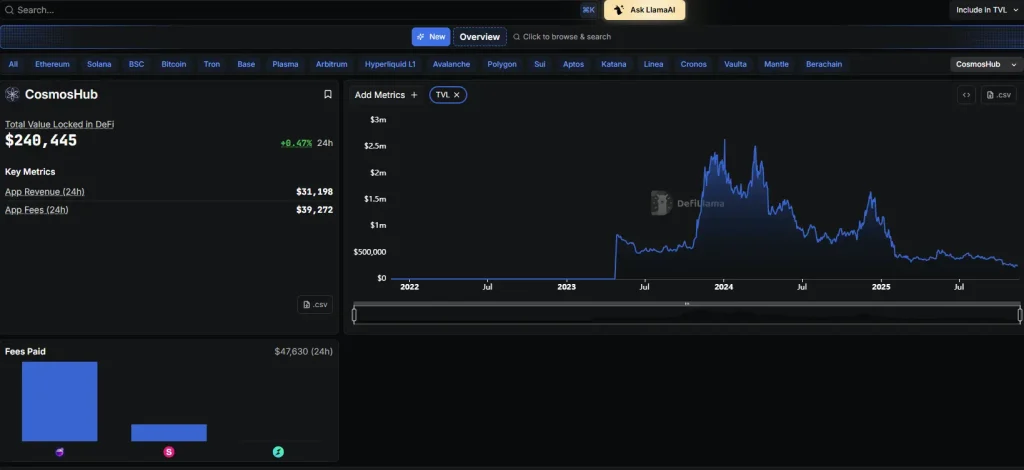
Now you are ready to start the node. The sync process can take days or weeks depending on your hardware and whether you start from scratch or use a snapshot. Use the start command to begin.
cosmoshubd start
Watch the logs for the committed block height. If your node falls behind, you may need to prune old states or use a snapshot to speed up the process. Keep the terminal open; this node is now part of the Cosmos Hub network.
Deploy smart contracts for yield
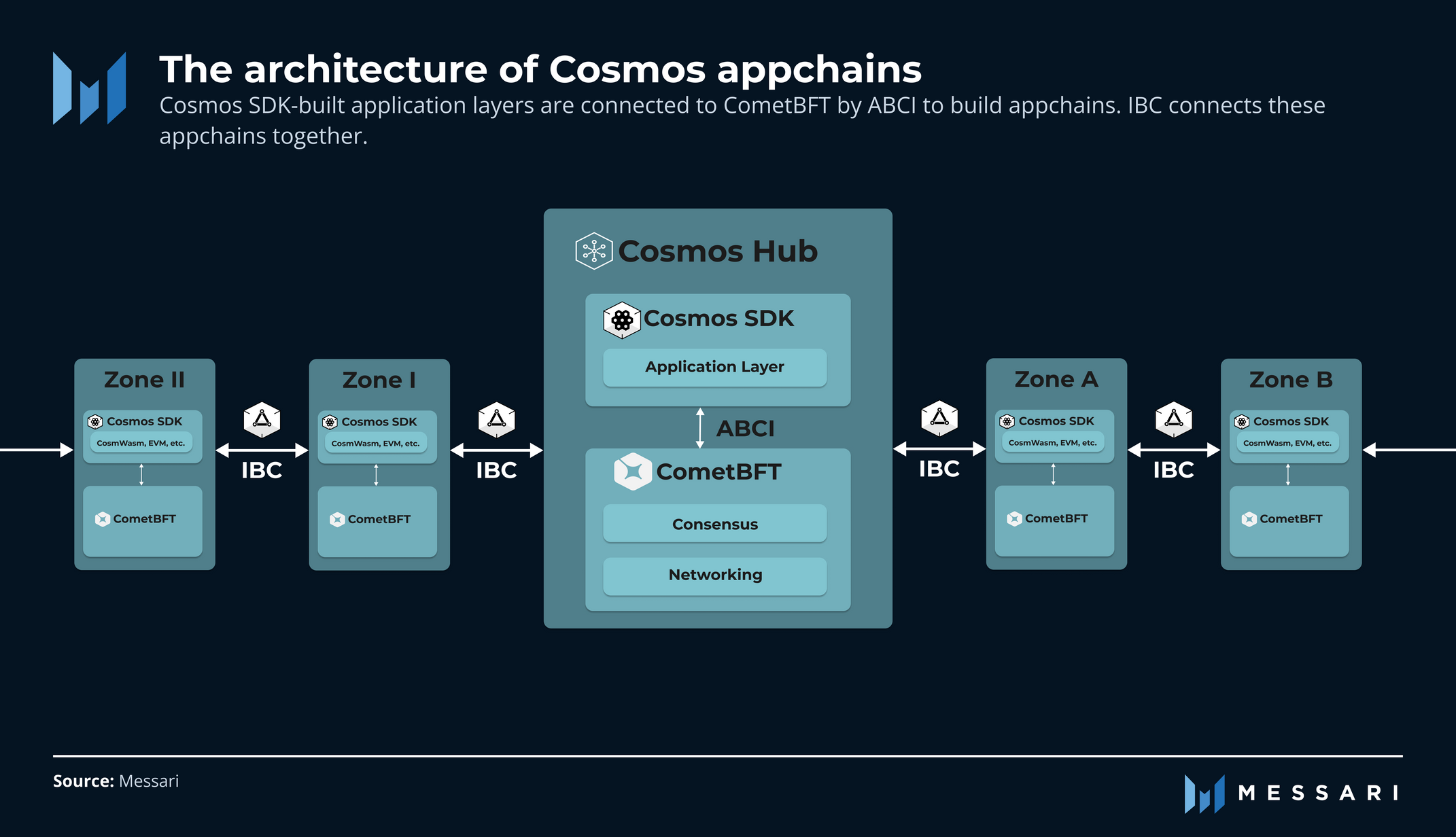
Deploying CosmWasm smart contracts is the mechanism for capturing interchain yield in the Cosmos ecosystem. Because these contracts execute on sovereign blockchains, they handle the logic for liquidity provision, staking, and cross-chain asset movement. The architecture allows you to build or interact with protocols that bridge assets between zones while maintaining security through IBC (Inter-Blockchain Communication).
The security of your yield depends on the integrity of the underlying CosmWasm contract. By sticking to audited protocols and verifying on-chain execution, you reduce the risk of loss. The Cosmos ecosystem’s modular design allows for specialized yield strategies, but the responsibility for security verification remains with the user.
Monitor performance and costs
Once your Cosmos node is running, the work isn’t done. You need to keep a close eye on node health, gas fees, and yield performance to ensure your infrastructure stays profitable and secure.
Start by tracking your node’s uptime and sync status. Cosmos offers official monitoring tools that integrate directly with your validator or full node. Check these metrics daily to catch any sync delays or missed blocks early. A lagging node can lead to slashing penalties, so prompt attention is critical.
Next, monitor gas fees and transaction costs. The Cosmos ecosystem uses IBC (Inter-Blockchain Communication), which means fees can vary depending on network congestion. Use block explorers like Mintscan to track real-time gas prices. If fees spike, consider adjusting your transaction timing or batching operations to reduce costs.
Finally, keep an eye on yield performance if you’re staking ATOM. Use official Cosmos blockchain explorers and wallet interfaces to verify rewards. Avoid third-party yield aggregators that promise unrealistic returns, as these often carry hidden risks. Stick to verified validators and official staking pools for consistent, secure earnings.
Common mistakes to avoid
Building on the Cosmos SDK is powerful, but the ecosystem’s interoperability is also its biggest liability. A single misconfigured channel or unvetted dependency can drain a treasury. Avoid these critical infrastructure errors before you go live.
Skipping security audits
Never deploy a chain or app without a formal security review. The Cosmos ecosystem is a high-value target for exploiters. Even minor logic errors in your custom modules can lead to total loss of funds. Hire a reputable firm to audit your code and run automated fuzzing tests. Treat the audit report as a blocker, not a suggestion.
Misconfiguring IBC channels
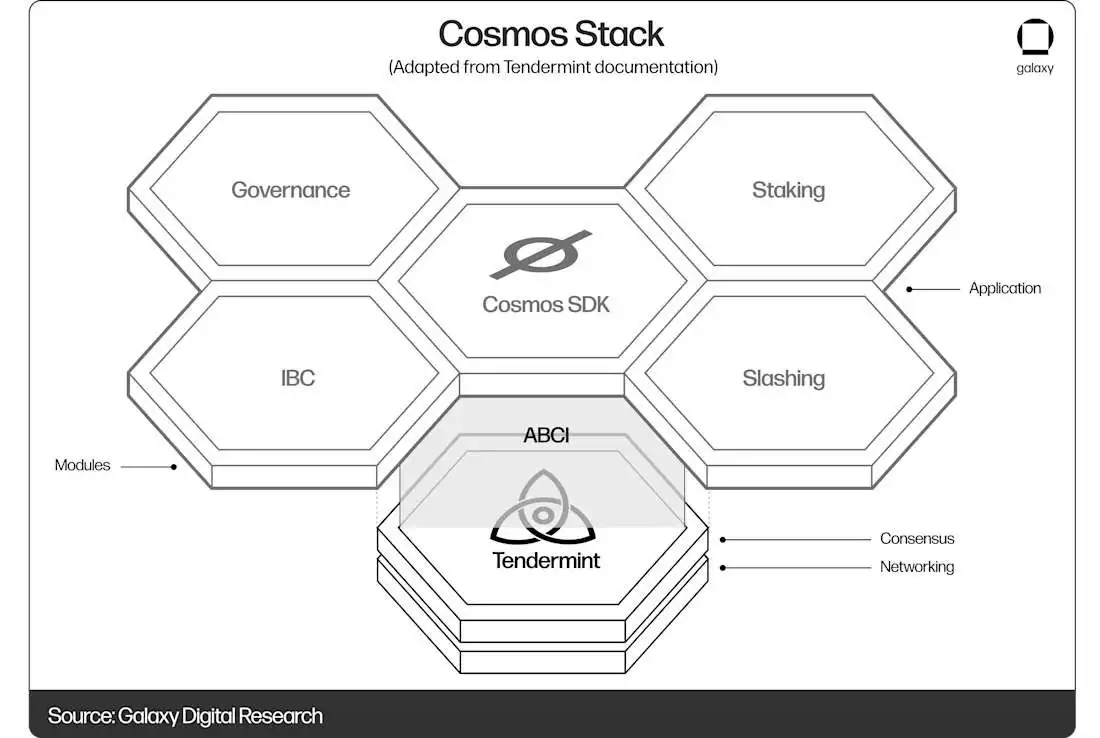
Inter-Blockchain Communication (IBC) is the backbone of the network, but it requires precise setup. Common pitfalls include incorrect port bindings, mismatched timeout parameters, or failing to verify counterparty chain versions. If your IBC channel is misconfigured, assets can become stuck or lost forever. Double-check your app.toml and config.toml settings against the official Cosmos documentation.
Ignoring governance and slashing risks
Your validator nodes are only as secure as your operational procedures. Failing to monitor slashing conditions or ignoring governance proposals can compromise your node’s uptime and reputation. Set up robust alerting for node health and participate actively in network governance. The Cosmos network relies on active stewardship to maintain security and performance.
No comments yet. Be the first to share your thoughts!