Choose your Cosmos SDK base
Launching a Cosmos zone starts with selecting the right foundational layer. You aren't just picking a blockchain; you are choosing the toolkit that will dictate your chain's performance, interoperability, and future upgrade path. For DeFi infrastructure, this decision is critical because the SDK version determines your access to the Inter-Blockchain Communication (IBC) protocol, which is the backbone of the Cosmos ecosystem.
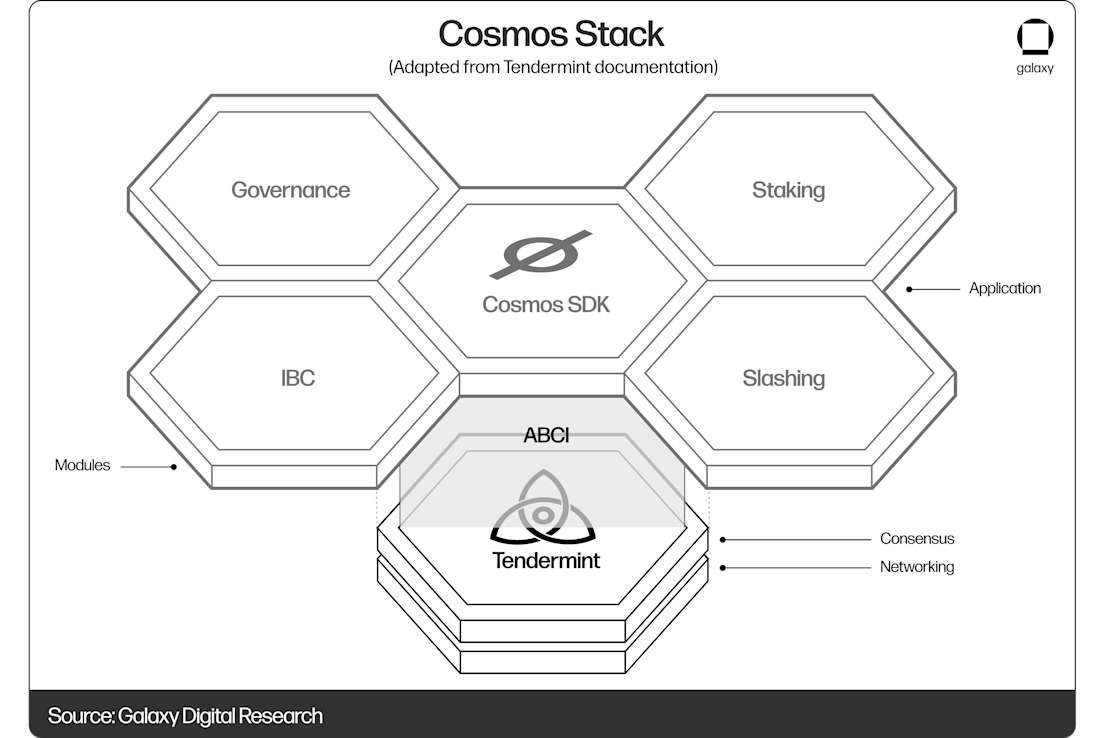
The Cosmos SDK is an open-source framework that allows developers to build sovereign blockchains. Think of it as the engine of your car: you can customize the body (the application logic), but the engine (the SDK) determines how fast you go and how well it connects to other vehicles on the road. Most modern DeFi projects on Cosmos use the latest stable version of the SDK to ensure compatibility with hubs like Cosmos Hub, Osmosis, and Celestia.
To get started, you should use Ignite CLI. It is the official scaffolding tool that simplifies the initial setup, allowing you to generate a working chain structure in minutes. This reduces the friction of configuring complex modules like staking, governance, and tokenomics from scratch.

Before you write any code, install Ignite CLI on your machine. It provides the commands needed to scaffold, build, and test your Cosmos SDK application. This tool handles the boilerplate, letting you focus on the specific DeFi features you want to implement, such as atomic swaps or liquidity pools.
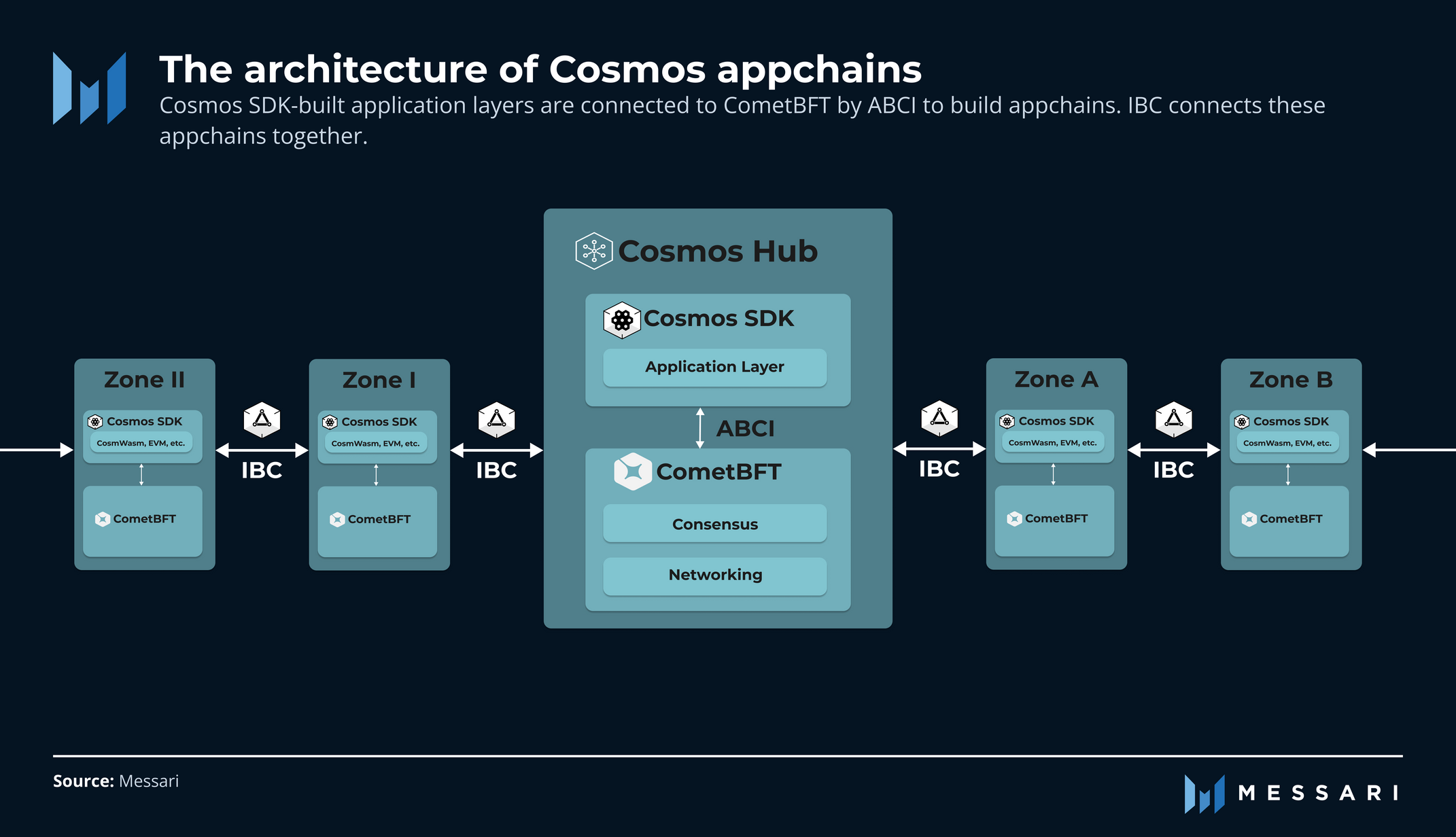
Choose the latest stable release of the Cosmos SDK. Newer versions include optimized IBC modules and better performance for high-throughput DeFi transactions. Check the official Cosmos documentation to verify which version is currently recommended for new chain launches to avoid using deprecated APIs.
Use Ignite to generate your chain's directory structure. This creates the necessary files for your app.go, genesis.json, and module configurations. You can then customize these files to define your token name, supply, and initial validator set, ensuring your DeFi infrastructure is ready for testing.


As an Amazon Associate, we may earn from qualifying purchases.
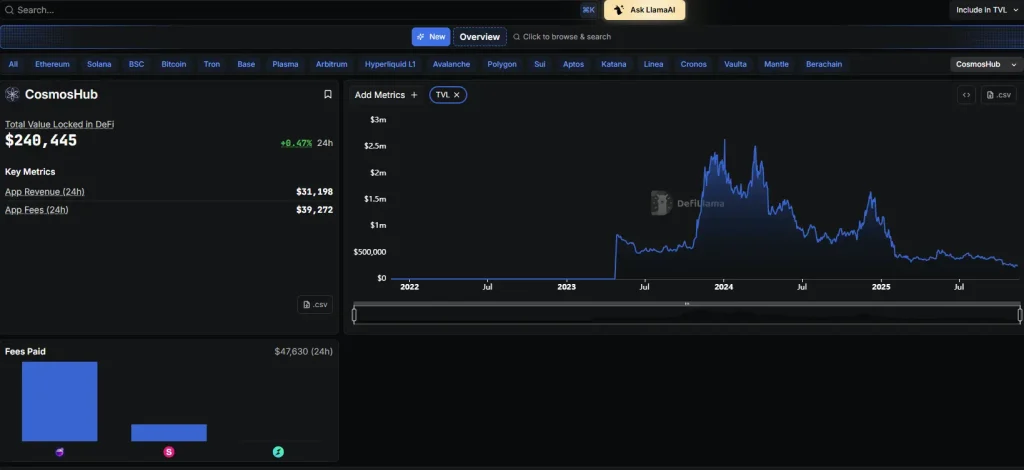
Once your base is set, you can begin integrating DeFi-specific modules. The Cosmos ecosystem is often called the "internet of blockchains" because of its interoperability, but this only works if your chain is built on a solid, up-to-date foundation. By choosing the right SDK version and using Ignite CLI, you ensure your DeFi infrastructure is ready to connect with the broader Cosmos network.
Configure IBC for cross-chain liquidity
Launch a Cosmos Zone works best as a sequence, not a scramble through settings. Do the minimum first: confirm compatibility, connect the core hardware, update only when needed, and test the result before adding optional features. That order keeps the task understandable and makes failures easier to isolate. After each step, pause long enough for the interface to finish syncing. Many setup problems are timing problems disguised as configuration problems. If the same step fails twice, record the exact error, restart the smallest affected piece, and retry before moving deeper.
Integrate DeFi primitives like Osmosis
Launch a Cosmos Zone works best as a clear sequence: define the constraint, compare the realistic options, test the tradeoff, and choose the path with the fewest hidden costs. That order keeps the advice usable instead of decorative. After each step, pause long enough to check whether the recommendation still fits the reader's actual situation. If it depends on perfect timing, unusual access, or a best-case budget, include a simpler fallback.
Deploy and verify chain security
Launch a Cosmos Zone works best as a clear sequence: define the constraint, compare the realistic options, test the tradeoff, and choose the path with the fewest hidden costs. That order keeps the advice usable instead of decorative. After each step, pause long enough to check whether the recommendation still fits the reader's actual situation. If it depends on perfect timing, unusual access, or a best-case budget, include a simpler fallback.
Monitor performance with Mintscan
Once your zone is live, you need a reliable way to track its health without staring at terminal logs all day. Mintscan serves as the primary block explorer for the Cosmos ecosystem, functioning like a dashboard that translates raw blockchain data into readable metrics. It is the standard tool for validators and node operators to verify that their infrastructure is performing as expected.
Verify block production and consensus
Navigate to your zone’s specific page on Mintscan to confirm that blocks are being produced at the expected rate. Look for the "Latest Blocks" section to ensure there are no gaps in the chain. If you see significant delays or missed blocks, it may indicate network congestion or node synchronization issues that need immediate attention.
Track transaction volume and fees
Monitor the transaction throughput to understand user engagement and network load. Mintscan displays real-time data on transactions per second and average gas fees. A sudden spike in volume should correlate with stable block times; if fees skyrocket without a proportional increase in successful transactions, your mempool might be clogged.
Audit validator status and staking
Use the validator tab to check your operator’s commission, voting power, and uptime. Mintscan provides a clear view of your slash history and any missed attestations. Keeping an eye on these metrics ensures you remain competitive in the staking market and avoid penalties that could reduce your rewards or reputation.
Review IBC transfer activity
Since Cosmos relies on the Inter-Blockchain Communication (IBC) protocol, monitoring cross-chain transfers is essential. Check the IBC transfer history to see how assets are moving between your zone and other networks like Osmosis or Cosmos Hub. This data helps you identify which partnerships are driving liquidity and which channels might need optimization.
Frequently asked questions about Cosmos DeFi
Developers and investors often have specific concerns when considering Cosmos for DeFi infrastructure. Here are the most common questions regarding the network's viability and utility.
No comments yet. Be the first to share your thoughts!